Should I Use WordPress.com or Self-Hosted WordPress?
 WordPress Development
|
WordPress Development
|  4 minutes
Table of Contents
- What WordPress.com Actually Is
- WordPress.com: Strengths and Limitations
- Self-Hosted WordPress: Strengths and Limitations
- Why Almost Every Business Should Choose Self-Hosted WordPress
- How to Tell Which One You Currently Have
- Frequently Asked Questions
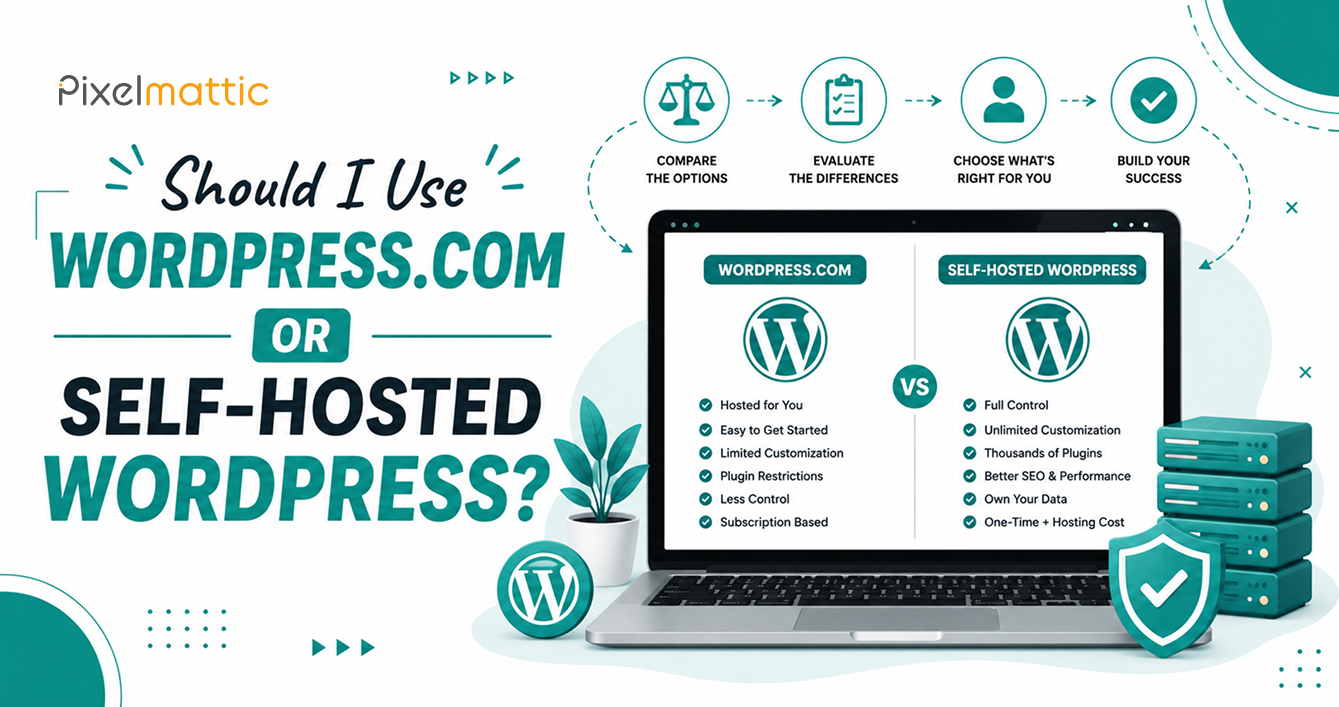
One of the most persistent sources of confusion for business owners is the difference between WordPress.com and self-hosted WordPress (using software from WordPress.org). They share a name and underlying codebase, but they are fundamentally different products with very different implications for your business.
This guide clarifies the distinction and helps you choose the right option.
What WordPress.com Actually Is
WordPress.com is a hosted platform — similar in structure to Wix or Squarespace — where Automattic (the company behind WordPress.com) manages the hosting, security, and infrastructure on your behalf. You sign up, choose a plan, and build your site within their managed environment.
This is different from self-hosted WordPress, where you download the free WordPress software from WordPress.org and install it on hosting of your own choosing, giving you full control over the server environment.
WordPress.com: Strengths and Limitations
Strengths: Simple setup with hosting and security handled for you, various plans from free to premium, and less technical responsibility for the site owner.
Limitations: The free and lower-tier plans have significant restrictions — limited or no plugin installation, limited customisation, WordPress.com branding on lower tiers, and restrictions on monetisation and custom functionality. Even paid business-tier plans, while more flexible, still operate within Automattic’s ecosystem constraints rather than giving you the full, unrestricted flexibility of self-hosted WordPress.
Self-Hosted WordPress: Strengths and Limitations
Strengths: Complete control over hosting, full plugin and theme ecosystem access, no platform restrictions on functionality or monetisation, complete ownership of your data and code, and the ability to choose your own hosting provider based on your specific performance and budget needs.
Limitations: You (or your developer/agency) are responsible for security, updates, and backups, requires choosing and managing a hosting provider, and carries more technical responsibility overall — though this is entirely manageable through a maintenance plan.
Why Almost Every Business Should Choose Self-Hosted WordPress
For genuine business use — where you need full plugin access, custom functionality, professional email integration, complete design control, and no platform-imposed restrictions — self-hosted WordPress (from WordPress.org) is almost always the right choice. This is what web development agencies and professional developers are referring to by default when they say ‘WordPress website’.
WordPress.com’s more restrictive plans are better suited to personal blogs, hobby projects, or extremely simple use cases where the trade-off of reduced control for simplified management makes sense.
How to Tell Which One You Currently Have
If your website URL includes ‘wordpress.com’ (like yoursite.wordpress.com) or if you signed up directly through wordpress.com and pay Automattic for your plan, you’re on WordPress.com. If you have your own domain, chose your own hosting provider, and installed the WordPress software yourself (or had a developer do so) via a hosting control panel, you’re on self-hosted WordPress.
WordPress Setup
Not Sure Which WordPress Setup Is Right for Your Business?
Not sure which WordPress setup is right for your business, or need to migrate from WordPress.com to self-hosted? Talk to Pixelmattic about the right path forward.
Frequently Asked Questions
Is WordPress.com free?
WordPress.com offers a free plan, but it comes with significant restrictions — including limited customisation, no custom domain (without a paid upgrade), and no plugin installation. Paid plans unlock more features but still operate within Automattic’s platform constraints.
Can I switch from WordPress.com to self-hosted WordPress?
Yes, WordPress.com offers export tools, and self-hosted WordPress can import that content. However, custom functionality and design typically need to be rebuilt, similar to any platform migration.
Which is better for a business website — WordPress.com or self-hosted WordPress?
For almost all genuine business use cases requiring custom functionality, full design control, and professional flexibility, self-hosted WordPress (from WordPress.org) is the appropriate choice.
 September 24, 2026
 WordPress Development
 WordPress Development
 WordPress Development
 WordPress Development