WordPress.org and WordPress.com, Which WordPress Website is better for you?
 CMS
WordPress Development
|
CMS
WordPress Development
|  2 minutes
WordPress is an open source Content Management System. While WordPress.org was created, a number of people wanted an easy to use website, where they did not have to bother about backing up content, security, keeping the site updated or even hosting. That is when Matt Mullenweg created WordPress.com with all the above features built in.
This is a common question among anyone who wants to build their own WordPress website. In simple terms, you can choose between having an independent house where you need to take care of everything yourself(self hosted) or an apartment where the Landlord will take care of all that for you(free). The self-hosted being WordPress.org Vs the free WordPress.com.
These are the main categories to look at while choosing a platform
[accordion_item title=”Cost”]
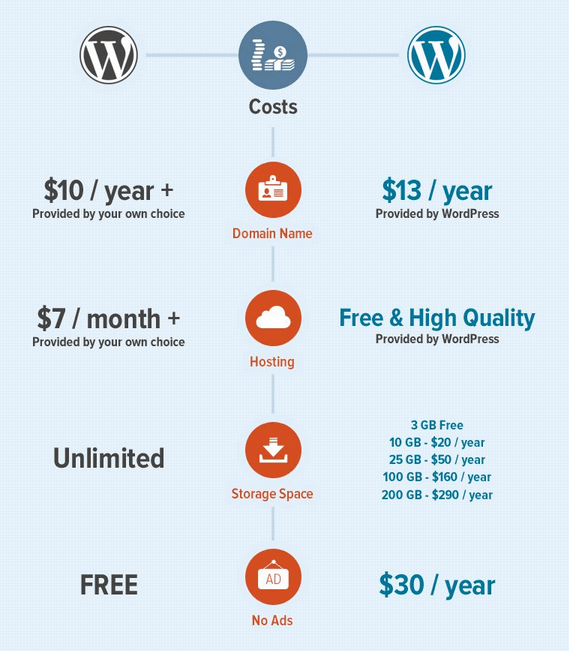
By choosing wordpress.org you will have to bear the expenses of hosting, themes and plugins you want.
WordPress.com on the other hand comes in three variations such as Basic(free), Premium($99) and Business($299).
[/accordion_item]
[accordion_item title=”Control on Website”]With wordpress.org, you will have full control of the site.You can add any theme or plugin. Have full control over your content without any ads. With WordPress.com, you will have only limited control. This offers limited storage, themes and plugins. There is also a limitation to the control you have on your content.[/accordion_item]
Struggling With WordPress Performance At Scale?
[accordion_item title=”Maintenance”]wordpress.org requires a lot of responsibility in the maintenance field. You need to check the updates, backups, security and more. If it is a bit too much to handle all the responsibilities, these tasks can be taken care of by your WordPress hosting companies too. WordPress.com is very easy to maintain as you do not have to keep up with WordPress news and take preventive actions. It will all be done for you by WordPress.[/accordion_item]
Still confused? Have a look at this video and see if that helps you decide:
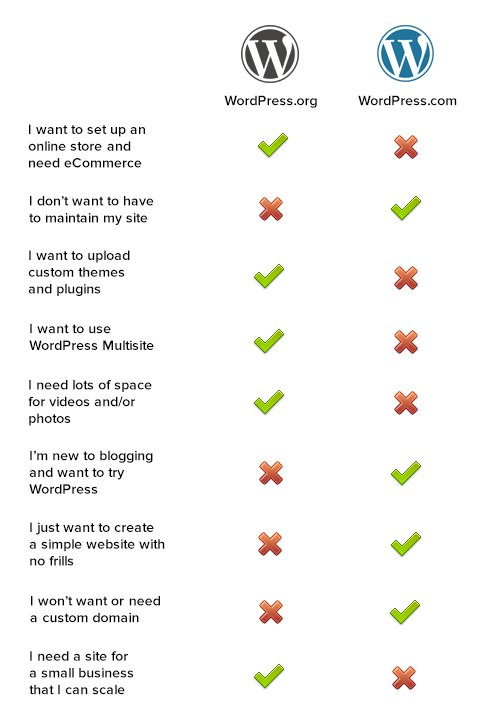
Finally follow this checklist to make your decision:
[content_band inner_container=”true” no_margin=”true” padding_top=”0px” padding_bottom=”0px” border=”none” bg_color=”#e5e5e5″]
Planning on having your own website? Confused about how to start? Get in touch with us.
Error: Contact form not found.
[/content_band]
 July 27, 2026
 WordPress Development
 WordPress Development
 WordPress Development
 WordPress Development