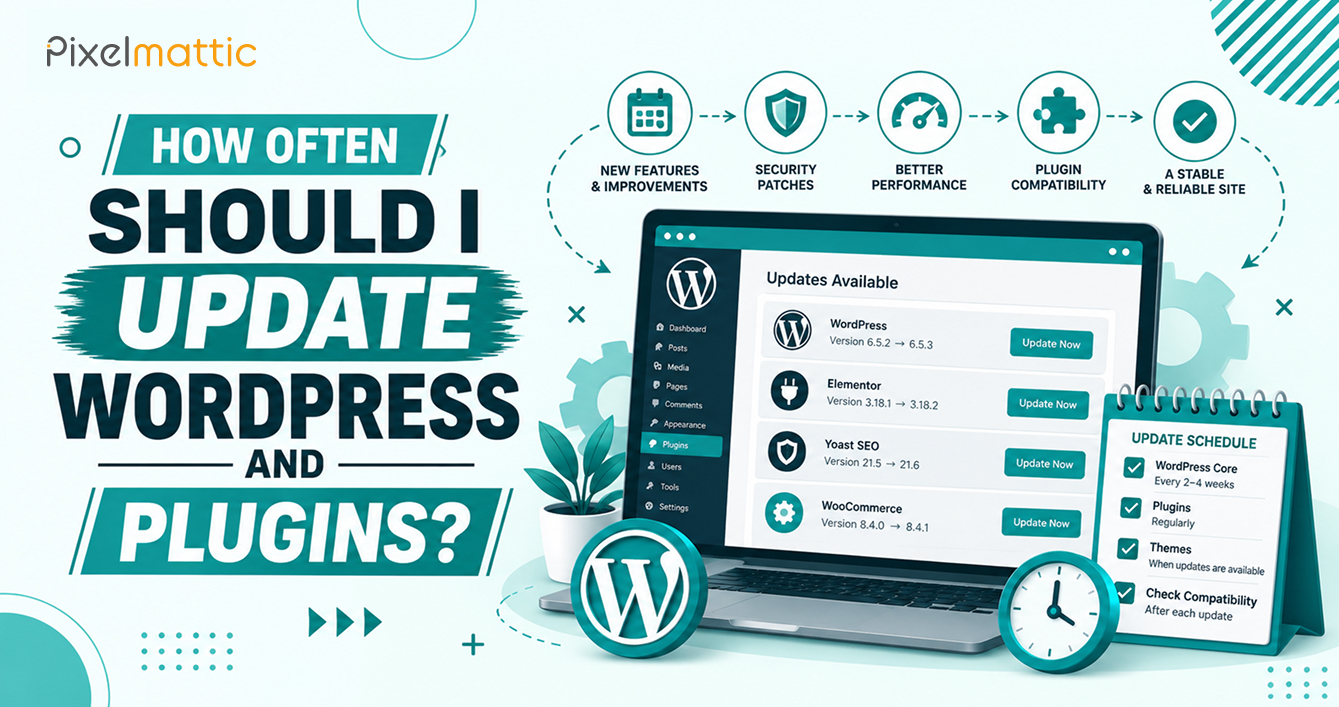
How Often Should I Update WordPress and Plugins?
 WordPress Development
|
 6 minutes
Table of Contents
- Short Answer
- A Practical Update Schedule
- Which Updates Can Run Automatically
- The Routine Behind Each Update
- What Goes Wrong When Updates Stop
- Updating a Site With Customisations
- A Sample Monthly Update Calendar
- Why a Missed Update Is Harder Than It Looks
- Updating While Campaigns Are Running
- Who Should Do It
- Frequently Asked Questions
Short Answer
Apply security updates within a few days, check for plugin and theme updates weekly, and batch routine updates monthly. Test on a staging site first for anything that touches checkout, forms, or layout. WordPress installs minor core releases automatically by default, but major core updates and most plugin updates deserve a quick test before they go live.
Updating sets two risks against each other. Delay and you carry known vulnerabilities. Rush and you may break a page that earns you leads. A fixed schedule settles the argument, because nobody has to decide each time.
A Practical Update Schedule
Security Patches
When a plugin or WordPress release is labelled a security fix, aim to apply it within 24 to 72 hours. Attackers scan for sites running vulnerable versions soon after details become public.
Plugins and Themes
Check weekly and apply updates in a planned monthly window, with exceptions for security releases. Batching keeps the list short, so if something breaks you can trace it to a small set of changes.
WordPress Core, Minor Releases
These cover security and maintenance fixes and install automatically by default. Leave that on.
WordPress Core, Major Releases
Wait one to two weeks after a major release, until the first point release clears early bugs. Then test on staging against your theme and key plugins before updating the live site.
PHP Version
Review it once a year. Hosts retire old PHP versions on a schedule, and unsupported versions stop receiving security fixes.
Which Updates Can Run Automatically
Low-risk plugins with simple jobs, such as an SEO or security plugin from an established vendor, are reasonable to auto-update. Keep manual control over WooCommerce, page builders, form plugins, membership tools, and anything custom, because these touch revenue or layout.
The Routine Behind Each Update
- Take a fresh backup before touching anything.
- Apply the update on a staging copy first.
- Test the pages that make money: contact forms, checkout, login, and your top landing pages.
- Confirm analytics and conversion tracking still fire.
- Push the update to the live site and watch it for the next 24 hours.
What Goes Wrong When Updates Stop
Sites that skip updates for six months or more face bigger, riskier jumps later, where several major versions change at once. Catching up is slower and costs more than steady upkeep. Abandoned plugins are a related problem. If a plugin has not been updated in a year, plan its replacement before it becomes a security hole.
Updating a Site With Customisations
Sites with custom code, a custom theme, or a heavily configured page builder need a more careful routine than a simple brochure site. Custom code often relies on specific behaviour from WordPress or from a plugin, and an update can change that behaviour without any warning on the update screen.
For these sites, read the changelog of every plugin before updating. Look for words such as deprecated, removed, or breaking change. Keep the custom code in version control, so every change is tracked and a faulty release can be reverted in minutes. If your site has never been through a staging process, set one up before the next update window, not after the first failure.
A Sample Monthly Update Calendar
- Week one: Check the list of available updates, read changelogs for anything major, and take a fresh backup.
- Week two: Apply updates on staging, test the pages that matter, such as forms, checkout, and login, and log any issues.
- Week three: Push approved updates to the live site and watch error logs and uptime for 24 to 48 hours.
- Week four: Review plugins for abandonment, remove anything unused, and note items to replace next quarter.
Security releases skip the calendar. They get handled as soon as they are confirmed and tested.
Why a Missed Update Is Harder Than It Looks
A plugin that is one version behind updates in seconds. A plugin that is eight versions behind may need database migrations that run in sequence, and a jump across a major release can change how it stores your settings. The same applies to WordPress itself. Sites that skip updates for a year often need a proper project to catch up, with testing on staging and a rollback plan. Steady, small updates are the cheapest way to avoid that outcome.
Updating While Campaigns Are Running
Timing matters as much as frequency. Avoid pushing updates in the middle of a paid campaign, a product launch, a sale, or a busy season, since a problem at that moment costs the most. If a security patch cannot wait, apply it, then test your landing pages and forms straight afterwards.
Agree a standing rule with your team: updates go out on a quiet weekday morning, never on a Friday afternoon, and always with someone available to fix problems for the next day. A boring, predictable routine does more for site stability than any single tool.
It also helps to keep a short record of every update, with the date, the versions, and who approved it. When something breaks, that log narrows the cause in minutes instead of hours.
Who Should Do It
If nobody on your team is comfortable with staging and rollbacks, give the job to your developer or put it inside a maintenance plan. Updates without a named owner are the ones that do not happen.
Would Rather Not Spend Your Month-End on Plugin Updates?
Pixelmattic handles updates with staging, testing, and rollback so your site stays current without surprises.
Frequently Asked Questions
Is it safe to turn on auto-updates for everything?
Not for a business site. Auto-updates suit simple, low-risk plugins. Anything tied to checkout, forms, memberships, or page layout should be tested first, because a bad update there costs real revenue.
Should I update immediately when a new version of WordPress is released?
For minor security releases, yes, and WordPress usually does this itself. For major releases, wait a week or two and test on staging first.
How do I know if an update is a security release?
Read the plugin changelog and the update notice. Vulnerability databases such as Patchstack and WPScan also list disclosed issues by plugin and version.
 October 29, 2026
 WordPress Development
 WordPress Development
 WordPress Development
 WordPress Development